


Grubhub for Drivers
4.515.23K Reviews
App Specs
- Version
- 5.39
- Updated On
- License
- Free
- Downloads
- 1,000,000+
- Developer
- Grubhub
- Categories
- Business
- Platform
- Android, iOS
Screenshots
 Analysis by AppCompare
Hey there! So, I recently took Grubhub for Drivers for a spin, and let me tell you, it’s quite the ride. If you're thinking of jumping into the gig economy as a delivery driver, this app might just be your new best friend. Let me break it down for you.
What to Expect Before Your First Shift
For a new driver, the first useful question is not whether the app looks simple, but whether its workflow fits the way you want to work. Grubhub for Drivers is a business app from Grubhub, aimed at people handling food orders rather than customers choosing meals. It is free, rated for Everyone, and its current version is 5.33. Those details make it easy to try on a compatible phone, but they do not make delivery work itself effortless: you still need to be comfortable driving, timing pickups, and communicating clearly when plans change.
I would approach the first day as a short trial rather than a promise to work a full shift. Learn where the key screens are before you start moving, check that your phone is charged, and decide which part of town you already know well. A familiar area can be more valuable than chasing a busy-looking location you cannot navigate confidently. The app can help organize an order, but local knowledge is still what helps you judge traffic, parking, and the best place to wait safely.
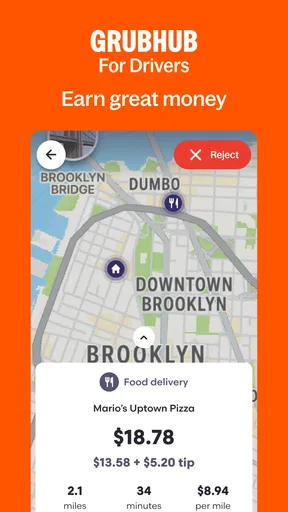
It is also worth separating the app’s convenience from the economics of a shift. An estimated earning shown with an order can help you decide whether to accept the work, but it is not the same as your take-home profit after vehicle expenses and time spent getting to a pickup. I would compare orders with the whole trip in mind: distance to the restaurant, likely waiting, the drop-off area, and whether the route leaves you somewhere useful for the next order. That quick mental check is more practical than judging an offer by one number alone.
Speed Expectations and Staying Oriented
The app’s pace matters most when a restaurant is busy and the customer is waiting. The order details and navigation are intended to keep the pickup and delivery steps together, so you are not relying on memory for an address or special instruction. In ordinary use, that kind of single-workflow setup can feel quicker than jumping between notes, messages, and a separate map for every detail. Still, speed depends on your phone, connection, traffic, and how smoothly the restaurant handles the order; no delivery app can make those parts move faster.
A useful habit is to review the destination and any customer note while stopped, before leaving the pickup. That reduces the chance of trying to read small text at a junction or needing to pull over because you missed a gate or entrance detail. If you use an external mapping service, take a moment to confirm that the route makes sense for the vehicle and the area. The app’s navigation can guide the trip, but a driver should remain alert to road signs and changing conditions rather than treating a suggested route as infallible.
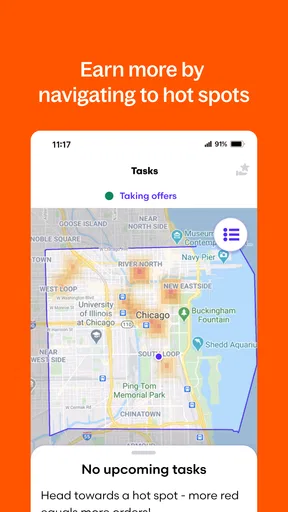
The real-time map and hotspot view can help you think about where demand may be concentrated, but I would treat it as a planning aid, not a guarantee of steady work. A busy zone can also mean heavier traffic, harder parking, and longer waits at popular restaurants. If you are new to an area, try comparing a hotspot with a quieter nearby location you can reach safely. The best choice is often the place that balances potential orders against the time and hassle required to get there.
Worth Reading Before You Choose

EA SPORTS FC Mobile 26 Is a Bigger Football Game, but It Takes Time

Flipboard Shows What News Apps Must Do Beyond the Feed

Switching to Android Auto Means Rethinking Your Driving Routine

Google Calendar Makes a Crowded Week Easier to Manage

Ludo King Makes the Most of the Minutes Between Plans

Baby Panda World Brings Quick Play to Modern Phones, but Its Game Library Feels Busy
Getting Started: The Sign-Up Process
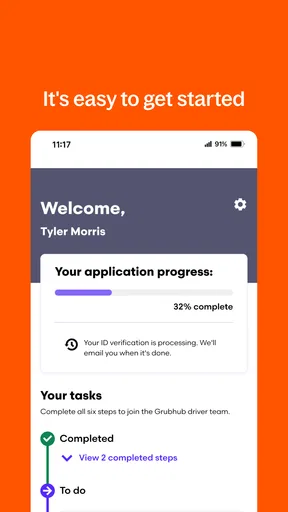
First things first, signing up for Grubhub for Drivers is pretty straightforward. You just download the app, fill in your details, and boom! You’re on your way to becoming a delivery pro. The app's interface is super user-friendly, and it guides you through each step of the registration process like a champ.
Once you're in, you’ll need to provide some basic info like your driver’s license and car details. Oh, and don’t worry if you’re not driving a fancy car; Grubhub isn’t picky about your ride. They just want to make sure it gets the job done.
The Dashboard: Your New Command Center
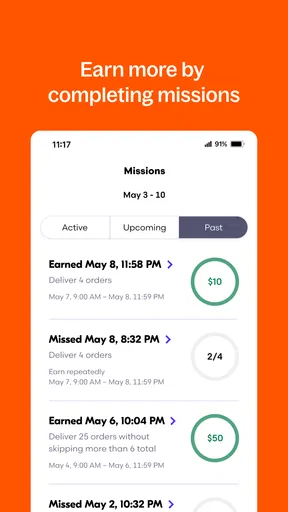
Now, let’s talk about the dashboard. This is where all the magic happens. The app presents you with a clean and intuitive interface that shows your daily earnings, upcoming deliveries, and available blocks. It’s like having a little command center right in your pocket.
One of the coolest features is the real-time map that lets you see where the hotspots are. If you’re looking to maximize your earnings, this is a game-changer. You can literally plan your day around the busiest areas. Just be prepared for some serious traffic in those zones!
Heavy-Use Moments: A Practical Shift Routine
During a busy stretch, the app becomes more than a place to check an order: it is the screen you may return to between pickup, travel, and drop-off. That is where a little preparation pays off. Before going online, I would make sure the phone has enough charge for maps and communication, and keep a charging option available if the shift may run long. Navigation and screen use can drain a battery faster than casual browsing, so treating power as part of your work setup is sensible even when the app itself feels light.
For example, imagine fitting deliveries around a day job. You finish work, open the app, and have a limited window before heading home. Rather than driving across town for a hotspot, choose a familiar restaurant area on your route, check the order details while parked, and consider whether the drop-off will leave you near home or pull you far away. A short session is most useful when it fits your existing trip; extra dead travel can eat into both your time and the value of the shift.
Another practical trade-off appears when a restaurant is not ready. The driver may be tempted to keep refreshing screens or send repeated messages, but neither action can make the kitchen finish sooner. I find it better to use the waiting time deliberately: confirm the order status, stay where staff can see you, and avoid blocking a busy entrance. If the delay changes what you can reasonably do next, use the app’s available communication or support route rather than making assumptions about what the customer has been told.
Deliveries: The Heart of the App
Delivering with Grubhub for Drivers is as easy as pie. When an order comes in, you get all the details you need: pick-up location, drop-off address, and any special instructions from the customer. The app even gives you a breakdown of the estimated earnings, so you know exactly what you’re getting into.
One thing I really appreciate is how seamless the navigation is. The app integrates with your preferred mapping service, making it super easy to find the quickest route. And let’s not forget the in-app chat feature that lets you communicate with customers if anything comes up. No more awkward phone calls!
Reliability When Plans Change
Delivery work is full of small surprises: traffic, a hard-to-find entrance, a restaurant delay, or an instruction that needs clarification. The app’s value is partly in keeping the order context and customer communication close together, so you can respond without reconstructing the situation from memory. I would still keep messages concise and factual. A short note about a genuine delay is more useful than a long explanation, and it is best sent while safely stopped rather than while driving.
The original experience here felt smooth and dependable in normal use, but reliability should be judged across a whole shift, not by a single screen opening quickly. When something does not load or a route changes, pause somewhere safe, check whether the order information is still visible, and then decide whether to retry or contact support. Avoid repeatedly tapping controls while moving. A driver’s most important recovery tool is often a calm stop and a clear next step, not speed-clicking through the interface.
Grubhub has a substantial user base: the app has more than a million installs, a 4.5 average rating from around 78,000 ratings, and about 15,000 written reviews. I see that as a reason to take it seriously as an established option, not as a guarantee that every driver will have the same experience. A rating cannot tell you how much demand there is in your neighborhood or whether a particular shift will suit your schedule. Local conditions and your own routine matter more than the overall score.
Managing Your Schedule: Flexibility at Its Best
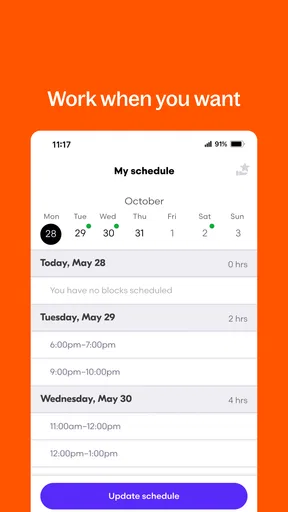
If there’s one thing that stands out about Grubhub for Drivers, it’s the flexibility it offers. You can choose your own hours, which means you can work around your other commitments. Whether you’re looking to make some extra cash after your 9-to-5 or want to go full-time, the choice is yours.
The app allows you to schedule blocks in advance or hop on whenever you have some spare time. It’s perfect for squeezing in a few deliveries during your lunch break or after the kids are in bed.
Who Benefits Most, and Who May Prefer Another Route
I think this is most appealing to someone who already has a reliable way to get around, knows at least part of the local area, and wants delivery work to fit around other responsibilities. The dashboard, order details, map, and customer chat put the key tasks in one driver-focused workflow. If you have used a general map app and messaging separately, the advantage is less about a flashy new tool and more about having the delivery context organized while you work.
Compared with other ways of doing food delivery, the main distinction to consider is the work platform and the local order flow, not a universal promise that one app will always pay better or be busier. A driver comparing services should look at which one has workable opportunities in their area, how its scheduling suits their availability, and whether its order handling feels clear in real traffic. If you already use another delivery platform, trying a short session with Grubhub can help you compare the practical workflow, but I would not assume that switching alone will improve earnings.
This is not the right fit if you need predictable income at a fixed hourly rate, cannot comfortably manage driving and phone navigation, or want work that stays entirely indoors. It may also be frustrating if you dislike making quick route decisions or dealing politely with delays. A restaurant employee, a customer using a food-ordering app, or someone seeking a guaranteed schedule would be better served by a different kind of app or job. Flexibility is useful, but it also means taking responsibility for deciding when and where to work.
Device Constraints and Everyday Comfort
The app’s current version is 5.33, and it requires Android 8.0 or later. That gives Android users a clear compatibility check before installing. The age rating is Everyone, but the working context is still adult delivery activity: the rating describes content suitability, not whether a person has the vehicle, documents, or circumstances needed to take on delivery work. If you use an older phone, check compatibility first and consider whether it remains responsive while running navigation alongside the driver app.
For a long shift, comfort can be as important as raw speed. Keep the device mounted where it does not obstruct your view, set up navigation before pulling away, and avoid handling the phone at a stoplight. A phone that overheats, loses charge, or struggles with maps can turn an otherwise simple workflow into a distraction. These are not unique to Grubhub, but they matter especially here because the app is used while coordinating real-world pickups and routes.
On iOS, the same decision-making advice applies: check that the app is available and compatible with your device in the relevant store before planning a shift. I would also test the basic workflow while parked before relying on it in a rush. Knowing how to find an order, read an instruction, and reach help is a small investment that can prevent fumbling when you are balancing a pickup and a customer’s timing.
Performance and Support: Always There for You
Performance-wise, the app runs smoothly without any major hiccups. It’s reliable, which is crucial when you’re depending on it to make a living. Plus, Grubhub offers solid support for drivers. If you run into any issues, their support team is just a tap away. You can reach out via chat or phone, and they’re usually pretty quick to respond.
"It’s like having a little command center right in your pocket."
Performance Verdict: Smoothness Is Only Part of the Job
My overall impression is that the app is designed to keep the practical parts of a delivery shift close at hand, and the everyday experience feels straightforward when the phone and connection are behaving normally. That is a useful baseline, but I would not judge a work app only by how quickly its dashboard appears. A good shift also depends on accurate attention to order details, safe phone habits, the restaurant’s pace, and sensible decisions about where to work.
If you are deciding whether to install it, think about your likely use rather than the most optimistic scenario. A few evening deliveries near familiar restaurants may be a reasonable way to see whether the workflow suits you. Someone planning to rely on it for regular work should pay closer attention to schedule fit, travel between orders, vehicle costs, and the stamina required to stay alert. The app can organize a delivery, but it cannot remove the trade-offs that come with doing the delivery.
Final Thoughts: Is Grubhub for Drivers Worth It?
All in all, if you’re looking to dive into the world of food delivery, Grubhub for Drivers is a fantastic option. The app is easy to navigate, offers great flexibility, and provides solid support, making it an excellent choice for anyone looking to earn some extra dough on their own terms.
So, if you’re ready to hit the road and start delivering delicious meals, give Grubhub for Drivers a try. You might just find yourself enjoying the ride!
Pros
- User-friendly interface with easy navigation.
- Flexible scheduling to suit driver availability.
- Real-time order tracking for efficient delivery.
- In-app support for quick assistance.
- Multiple payment options for drivers.
Cons
- High competition in busy areas.
- Limited availability in smaller towns.
- Order volume varies by location.
- Service fees can reduce earnings.
- Traffic can impact delivery times.
FAQs for Grubhub for Drivers
What is Grubhub for Drivers?
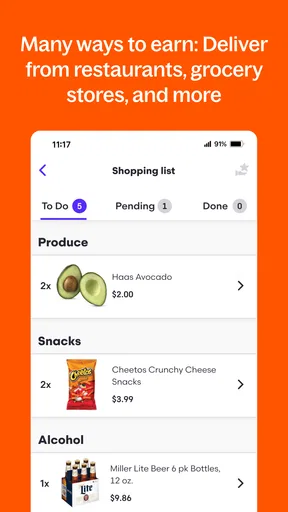
Grubhub for Drivers is a mobile application designed for delivery drivers who want to earn money by delivering food from local restaurants to customers. The app connects drivers with delivery requests, allowing them to accept orders, navigate to pickup locations, and efficiently deliver food to customers.
How do I sign up to become a Grubhub driver?
To sign up as a Grubhub driver, you need to visit the Grubhub for Drivers website or download the app. From there, fill out the application form, providing personal information, a valid driver’s license, and proof of insurance. After submitting, you'll undergo a background check and, if approved, can start delivering.
What are the requirements to drive for Grubhub?
To drive for Grubhub, you must meet several requirements. These include being at least 19 years old, having a valid driver’s license, owning a vehicle with auto insurance, and possessing a smartphone. Additionally, you should be able to pass a background check and have a clean driving record.
How does Grubhub pay its drivers?
Grubhub pays its drivers based on several factors, including the distance of the delivery, time spent, and tips from customers. Earnings are deposited weekly into the driver’s bank account. Drivers can track their earnings through the app, ensuring transparency and allowing them to plan their finances accordingly.
What is the driver experience like with Grubhub?
Driving for Grubhub offers flexibility, allowing you to choose your hours and work at your own pace. The app provides real-time order updates, navigation assistance, and customer contact options. Feedback suggests the app is user-friendly, but like any gig work, earnings can vary based on demand and location.


